
Auto crossover
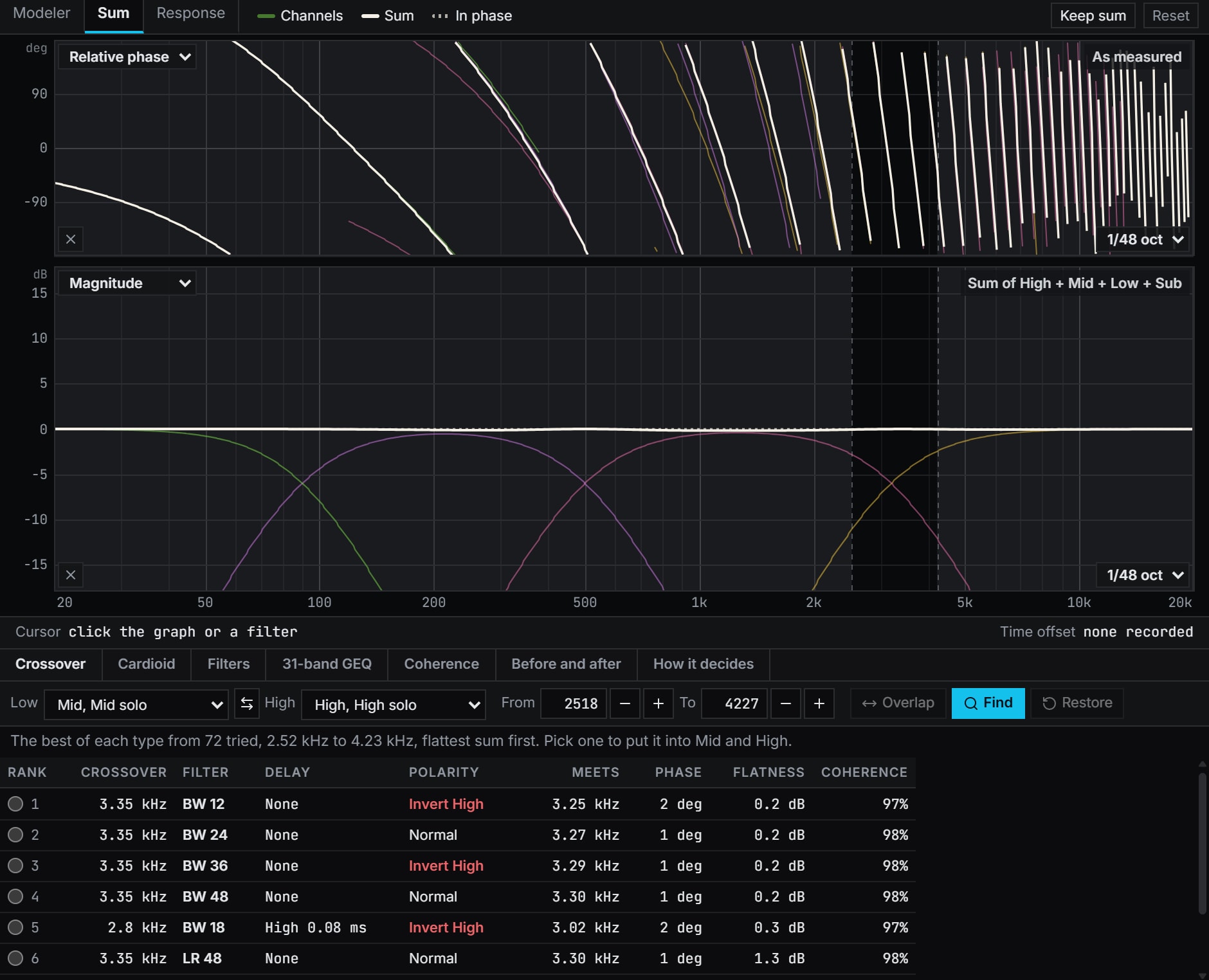
Crossovers between two measured drivers, tried as Linkwitz-Riley and Butterworth from 12 to 48 dB an octave, each with the delay and polarity Auto Phase gives it, and the best of each type ranked by how flat the sum is.
Inside Align: Tools, Auto crossover: the Sum's Crossover tab
How to use it
- 1
Capture each driver alone
With the processor's crossover off, capture each driver, then give each measurement a DSP channel of its own in the Sum, from the DSP settings.
- 2
Find
Tools, Auto crossover opens the Sum's Crossover tab. Choose Low and High and press Find: it tries every type at about every twelfth of an octave where the two are within 10 dB of each other, or between From and To.
- 3
Pick a row
The table ranks the best of each filter type, flattest sum first, with its delay and polarity, where the two meet, the phase there and the coherence. A pick shows on the Sum at once, and Restore puts back what the two held.
How Align works it out
What it computes and how, each line read off the code the tool runs.
It tries each filter pair at every preferred frequency, about a twelfth of an octave apart, across the band where the two drivers, through their channels, are within 10 dB of each other.
Reference: ISO 3, the R40 series of preferred numbers, the frequencies tried.
For each one, Auto Phase's own search gives the delay and polarity. The sum is then compared with a clean handover between the two drivers, each held at full strength: flatness is the RMS difference in dB, both smoothed in power to a sixth of an octave, over the band and an octave either side.
Reference: Bharitkar and Kyriakakis, Optimization of crossover frequency and crossover region response for multichannel acoustic applications, which scores a crossover by the spectral deviation of the sum. Align takes the deviation from the handover, not from the mean.
The table ranks by flatness to a tenth of a decibel, then by the phase gap where the two meet to 5 degrees, then by less delay and fewer filter sections.
A pair whose two halves never meet at equal level, or meet where coherence is under 0.5, goes to the foot of the table.
What you need
- Any browser to open a file; Chrome or Edge on a computer to measure live
- A measurement of each driver alone, with its phase, captured live or imported as text
- A processor whose crossovers you can set
- Pro
Learn it
Training teaches the measurement from the rig up, free to read with no account.
A 2, 3 or 4 way system, step by stepQuestions
- Does it set my crossover by itself?
- No. It is a table, never an automatic change: nothing goes into a channel until you pick a row, and Restore puts back what the two channels held.
- Should the crossover be on while I capture?
- No. A capture taken through a processor's crossover already carries that filter, and the one tried would go on top of it, so capture each driver with its crossover off.
- Does it change my channel levels?
- No. It never changes a channel's level, the third crossover setting: set that to your target first.
- Which filter types does it try?
- Linkwitz-Riley at 12, 24, 36 and 48 dB an octave, and Butterworth at 12, 18, 24, 36 and 48.
- Why would a Butterworth come out on top?
- On ideal drivers the Linkwitz-Riley types sum flat. A real driver's own roll-off adds to the filter, so another type can make the flatter sum, which is why Align measures each one.