
How to measure a room's reverberation time (RT60)
Play a log sweep through the system from Align's Impulse screen, then read T20 and T30 for each octave in its Decay and clarity table. Each is the time sound takes to fall 60 dB, worked from 20 or 30 dB of the decay, which is what RT60 means.
What you need
Pro- Chrome or Edge on a computer
- An audio interface and a measurement microphone, one interface for both the sweep out and the microphone in
- A loopback cable from the interface's output back to one input, with the microphone on another
- A quiet room while the sweep plays
- Hearing protection for everyone in the room: the sweep is loud
- Pro
Worked example: T30 is fitted from -5 to -35 dB of the decay. A band that falls those 30 dB in 0.4 s reads T30 0.8 s, as 60 dB takes twice as long as 30.
Step by step
- 1
Connect, then check the browser's processing
Press Connect in the control bar. Align asks the browser for echo cancellation, noise suppression and automatic gain off. When it worked, the status bar shows no Processing warning and the setup check's Browser processing reads Off. "ACTIVE" means the browser left one on, which changes the signal: turn it off in the browser's or the system's microphone settings, then connect again. "unconfirmed" means the browser did not report it: compare one reading with a known one before you trust a level.
- 2
Wire the loopback
Send the generator to the loudspeaker and, through the loopback cable, back to one input as the reference; the microphone goes on another. Internal loop reference does not serve this sweep, and one interface for out and in keeps separate device clocks from distorting it.
- 3
Open Impulse and check the channels
Open Impulse, or press I, and run the channel check with signal on one input only: Align asks for it before the first sweep.
- 4
Place the microphone
Where you want to read the room, at least 1 m from the walls and any other surface that reflects, and at least the critical distance from the loudspeaker, 2 times the square root of the room volume over the speed of sound times the expected time, 1.6 m in a 10 by 9 by 5 m hall that rings for about 2 s.
- 5
Set the level
Turn the system down first. Align keeps the Sweep level you set last time, so set it to -30 dBFS, its default, and raise it until the sweep is well clear of the room noise. Above -6 dBFS the sweep nears digital full scale, and an input that clips stops it.
- 6
Choose the length and the tail
Sweep length 4 s reads the room; 8 or 16 s also reads distortion. Make the Recording tail, 2 s by default and kept as you last set it, longer than the room takes to fall quiet.
- 7
Start IR sweep and read the table
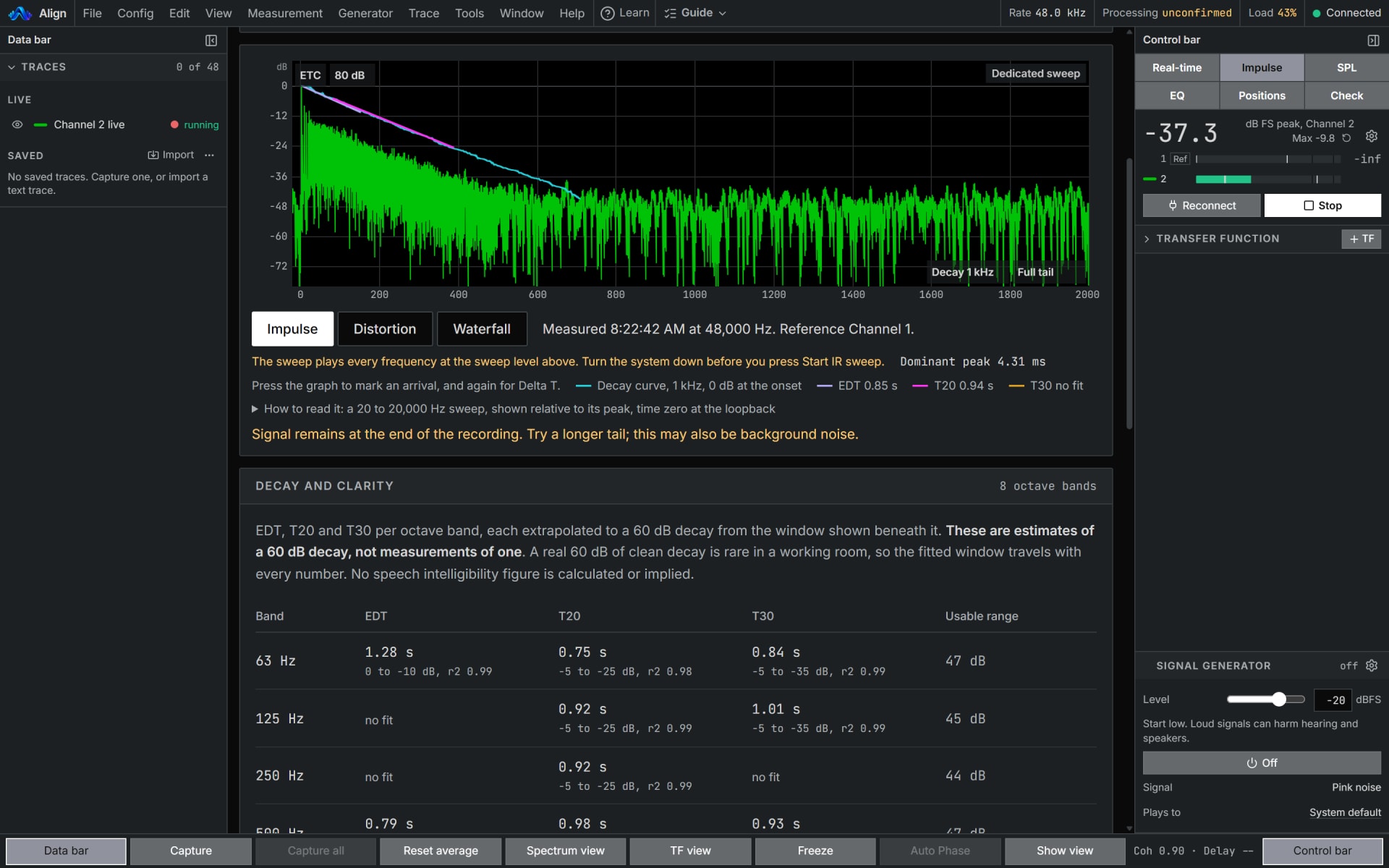
Press Start IR sweep. Decay and clarity lists EDT, T20 and T30 for each octave from 63 Hz to 8 kHz, each with the range it was fitted on and its r squared, then C50 and C80.
- 8
Sweep at other seats
Repeat where people sit, and move the loudspeaker too if you can, then average the seats band by band: the time varies across a room. Note how many people were in it, as people absorb sound and shorten the time.
- 9
Give the room one figure
Average the 500 Hz and 1 kHz bands: 0.59 s and 0.67 s give 0.63 s, written T[500 Hz, 1 kHz] = 0.63 s and called Tmid.
How you know it worked
- Every band you need shows a time, with an r squared close to 1: a fit under 0.9 is refused rather than shown.
- T20 and T30 come out close to each other: the decay is one straight slope.
- A second sweep at the same seat gives the same times.
- The figure fits the room: under 0.3 s is called dead; a classroom is recommended 0.4 to 0.6 s, an office 0.5 to 1.1 s and a lecture hall 1.0 to 1.5 s.
When it goes wrong
- A band reads "no fit"
- Its fit needs its lower end 10 dB above the noise: T30 about 45 dB of clean decay and T20 about 35. Raise the sweep level or quiet the room, or read T20 where T30 is missing. A fit with an r squared under 0.9 also reads no fit; the reason for each band is listed under the table.
- The times jump from one sweep to the next
- Low system level, a noise in the room during the sweep, or a faulty microphone. Raise the level, sweep again in quiet, and trust T20 where T30 keeps moving.
- "Invalid or clipped input."
- The input clipped and the sweep stopped. Lower the sweep level, or the input gain, and repeat.
- "Signal remains at the end of the recording."
- The room was still ringing when the recording ended, or the room's own noise was there. Set a longer Recording tail and sweep again.
- The low bands in a small room make no sense
- In a small room the low end follows the room's modes, not a spreading decay, so a reverberation time means little below a few hundred hertz. Read the low end on the transfer function instead.
The tools and words it uses
- Impulse and roomProA log sweep impulse, distortion from the same sweep, EDT, T20 and T30 per octave, C50 and C80.
- Transfer function and delayProThe system's magnitude, phase and coherence against what it is fed, with the delay found and inserted, live from up to 16 inputs.
Words: Impulse response, Sweep, dBFS.
More guides: EQ without over-correcting, Install Align and use it offline, Tune a sound system on Free, Find the delay between speakers, Read A and C weighting, Tune a car audio system, Tune a church sound system, Time align a sub to the mains, Calibrate the SPL meter, every guide.