
How to use A and C weighting on an SPL meter app
Read A for hearing and noise limits and C when the low end must count. Align's SPL meter shows LAeq, LCeq and LZeq over the same seconds whichever weighting you pick, so C minus A, LCeq less LAeq, says how much of the level sits in the bass.
What you need
Free- Chrome or Edge on a computer
- An audio interface and a measurement microphone
- An input calibrated to read dB SPL, as the Calibrate the SPL meter guide sets one up. C minus A and the crest factor need no calibration.
- No account: the SPL meter, its weightings and its timed runs are free
Worked example: A steady 63 Hz tone that reads 100.0 dB SPL on C reads about 74.6 on A and 100.8 on Z, as A takes 26.2 dB off at 63 Hz and C 0.8: a C minus A of 25.4 dB, nearly all of it bass. At 1 kHz all three read the same, since both curves are 0 dB there. Say a show reads LAeq,30s 96.0 dB and LCeq 104.6 dB over a 30 s run: its C minus A is 8.6 dB, the mean Michael Lawrence measured over 14 concerts in 2019.
Step by step
- 1
Connect, then check the browser's processing
Press Connect in the control bar. Align asks the browser for echo cancellation, noise suppression and automatic gain off. When it worked, the status bar shows no Processing warning and the setup check's Browser processing reads Off. "ACTIVE" means the browser left one on, which changes the signal: turn it off in the browser's or the system's microphone settings, then connect again. "unconfirmed" means the browser did not report it: compare one reading with a known one before you trust a level.
- 2
Pick A for hearing and noise limits
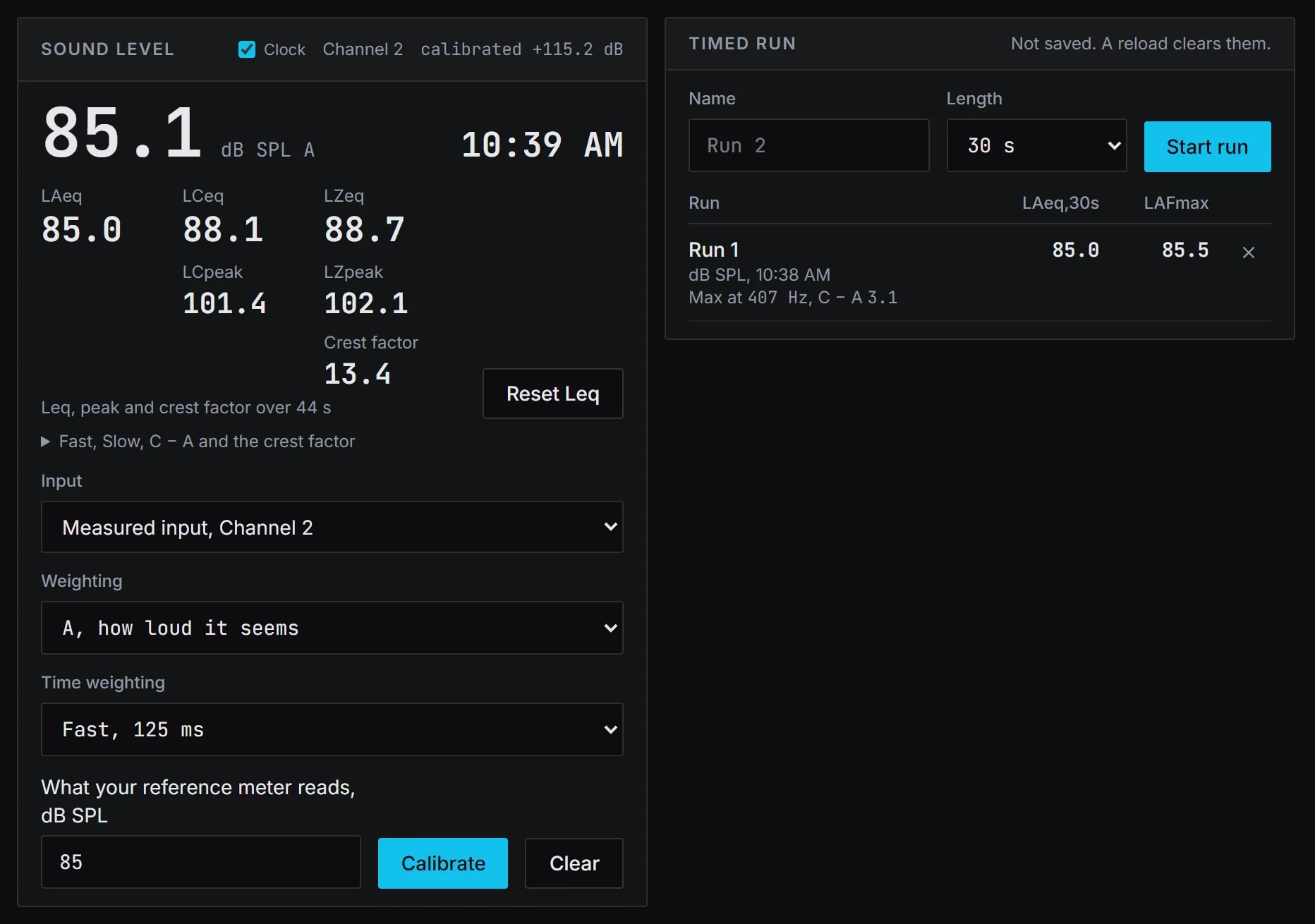
Open SPL and set Weighting to "A, how loud it seems". Hearing and noise limits are written in A: NIOSH sets its exposure limit at 85 dBA over an eight hour shift and recommends a meter on A and Slow, and the UK's noise at work values for daily exposure are in dB(A). The big level then reads dB SPL A.
- 3
Pick C when the low end must count
Set Weighting to "C, with the low end". At 63 Hz the A curve takes 26.2 dB off and the C curve 0.8 dB, so A all but ignores the sub range and C keeps it. Read C when the bass belongs in the figure, such as a show level.
- 4
Pick Z to read the source itself
Set Weighting to "Z, unweighted" when you want what the source puts out rather than what an ear makes of it. Z applies no filter.
- 5
Choose Fast or Slow
Time weighting offers "Fast, 125 ms" and "Slow, 1 s", each an exponential average of the squared signal. With those time constants, a loud sound switched on takes about 0.6 s to reach its level on Fast and about 5 s on Slow, and when it stops Fast falls 34.7 dB a second and Slow 4.3. Fast follows the music; Slow gives a steadier figure to read and is what limits for hearing are read on.
- 6
Read the three Leq
Under the big level, LAeq, LCeq and LZeq are each the energy average over the same seconds, whatever weighting you picked. The line under them says how long they cover. Press Reset Leq where the passage you want starts: Fast and Slow carry on, only the average starts again.
- 7
Read the peaks
Under LCeq and LZeq sit LCpeak and LZpeak, the greatest instantaneous level over the same seconds, read between the samples too. There is no A peak: peak limits are C-weighted, as in the UK's 135, 137 and 140 dB(C). On a calibrated input, an LCpeak over 140 dB turns red with a line naming WHO's limit, 120 at events for children.
- 8
Open the fold and read C minus A
Open "Fast, Slow, C − A and the crest factor". C minus A is LCeq less LAeq over the same seconds, so it grows with the energy below where A weighting listens. Full-band pink noise reads just under 2 dB, recorded music about 4 to 5 and live music about 8. It is a difference, so dB and never dB SPL, and calibration does not move it.
- 9
Keep a timed run
In Timed run, choose a Length from 10 s to 5 min, 30 s unless you change it, and press Start run. The run measures exactly that length, then keeps its Leq, its Max and its C minus A. Weighting and Time weighting stay fixed until it ends.
- 10
Set one run against another
Change the sub level or the mix, keep a second run, and choose the first under Compare with. The table shows each run's change, and its C − A column moves with a change in the low end even when the Leq hardly does.
How you know it worked
- At 1 kHz, from a calibrator or a tone, LAeq, LCeq and LZeq read the same to within 0.1 dB.
- Steady full-band pink noise reads a C minus A just under 2 dB.
- Before you hold a level against a limit, its unit reads dB SPL; C minus A and the crest factor read the same calibrated or not.
When it goes wrong
- C − A reads --
- Either side is at the floor, so there is no balance to read. Press Connect in the control bar and play a signal.
- The A level looks low for how heavy the show sounds
- A all but ignores the sub range. Read LCeq beside it and the C − A in the fold: a large gap means much of the level is bass.
- C minus A fell but the bass did not change
- More upper mids raise LAeq and close the gap with the bass unchanged, as when vocal harmonies come in. Read C minus A beside LAeq.
- Weighting and Time weighting will not change
- A timed run is going: "Fixed until the timed run ends." Let it finish, or press Cancel, then change them.
The tools and words it uses
- SPL meterFreeSound level in A, C and Z weighting, Fast and Slow, with three Leq at once, LCpeak, LZpeak, the crest factor and timed runs. With Pro, a show log of the moving 15 minute LAeq and a one page show report.
- RTAFreeThe spectrum of what the microphone hears, live: a line for every frequency, and bars from whole octaves down to 1/24 octave with a held peak above each.
Words: dB SPL, Crest factor, Pink noise.
More guides: Tune a car audio system, Tune a church sound system, Time align a sub to the mains, Calibrate the SPL meter, Measure reverberation time, EQ without over-correcting, Install Align and use it offline, Tune a sound system on Free, Find the delay between speakers, every guide.