
How to time align a subwoofer with your main speakers
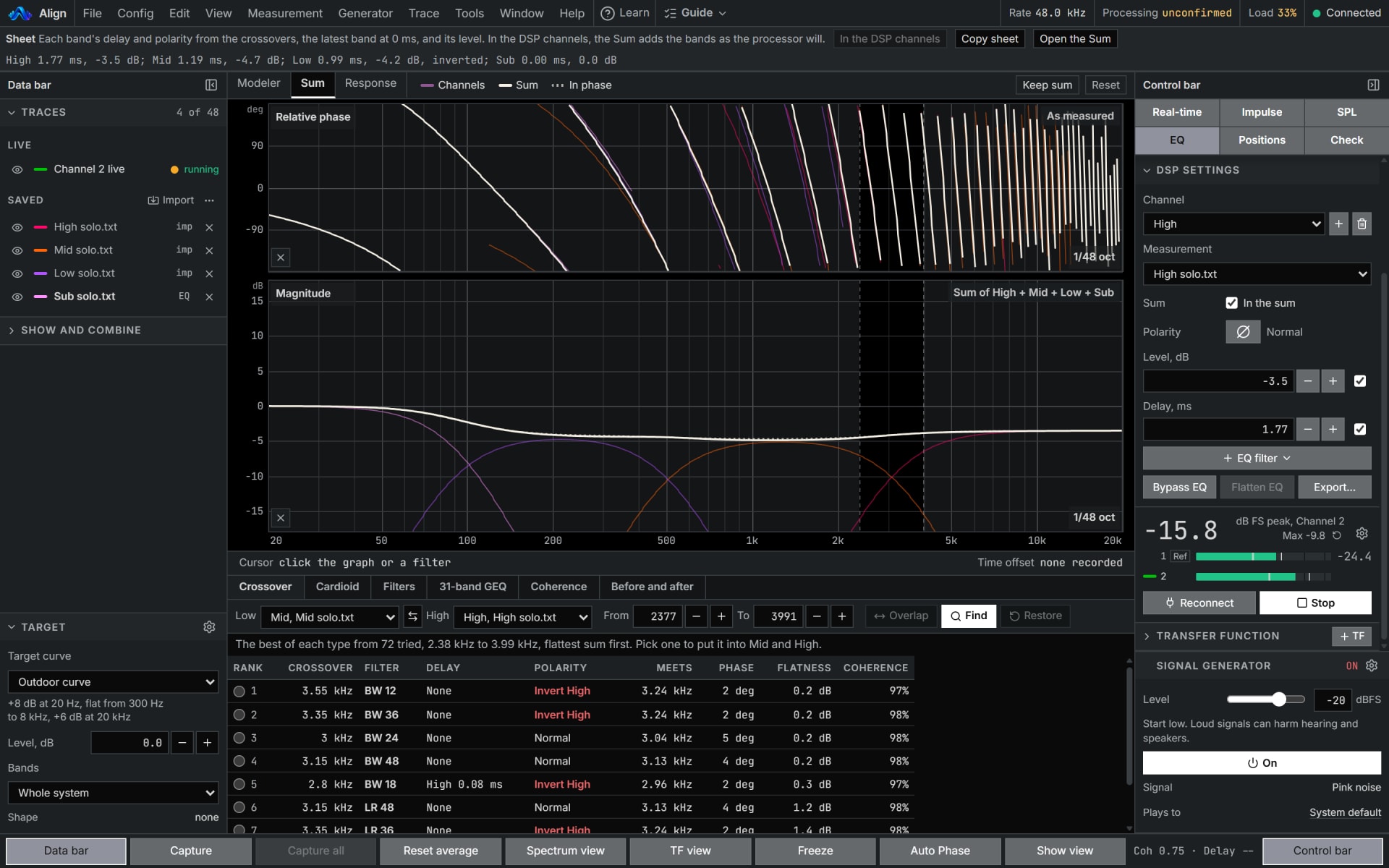
Measure the mains and the sub one at a time on one inserted delay, then run Auto Phase across the band where they overlap: it sets the delay, on the sub or on the mains, and the sub's polarity. Check the Sum against its In phase line before you trust it.
What you need
Pro- Chrome or Edge on a computer
- An audio interface and a measurement microphone, with two inputs
- A processor whose delay and polarity you can set for the sub and the mains
- Pro
Worked example: With a crossover at 100 Hz one period is 10 ms, so a sub half a period late, 5 ms, cancels at the crossover. A sub can arrive that late with the microphone the same distance from both, from its own low-pass filter and processing, which is why the steps measure it rather than work it out. Where the boxes stand apart, distance adds about 2.9 ms a metre at 20 C.
Step by step
- 1
Connect, then check the browser's processing
Press Connect in the control bar. Align asks the browser for echo cancellation, noise suppression and automatic gain off. When it worked, the status bar shows no Processing warning and the setup check's Browser processing reads Off. "ACTIVE" means the browser left one on, which changes the signal: turn it off in the browser's or the system's microphone settings, then connect again. "unconfirmed" means the browser did not report it: compare one reading with a known one before you trust a level.
- 2
Set the reference
Feed the transfer function's Reference with a split of what the system is fed, or choose Internal loop reference to use Align's own output.
- 3
Play pink noise
Play pink noise from the generator.
- 4
Place the microphone
On the floor, the same distance from the sub's and the mains' grilles, 1 to 2 m away, where the coherence through the crossover holds at 95 percent or more.
- 5
Mute the sub
Mute the sub at the processor so only the mains play.
- 6
Time the mains
With Follow off, set the delay finder's Delay band to Full band, press Find in the control bar's Transfer function section, then Insert. That delay is the clock every band is measured on, so leave it in from here on.
- 7
Capture the mains
With only the mains playing, press Capture. If the pink noise stops, as it does unless "Stop the noise after a capture" is off in Preferences, start it again.
- 8
Solo the sub
Mute the mains and unmute the sub at the processor.
- 9
Match the sub's level
With the mains' capture shown, set the sub's level at the processor so its live trace matches that capture through the crossover. Level comes before timing: once the levels match, phase decides the sum.
- 10
Find the sub
Set the Delay band to Sub, then Crossover, Hz to the system's crossover, then press Find. Its Residual says how far the sub sits behind the mains: a starting point, to finish on the phase.
- 11
Capture the sub
With only the sub playing, press Capture, then start the pink noise again if it stopped.
- 12
Choose A and B
In the control bar's Auto Phase, set A to the mains capture and B to the sub capture.
- 13
Press Overlap
Overlap sets the band where the two are within 10 dB of each other, the band the search scores.
- 14
Press Auto Phase
If the Residual was more than 15 ms, set Search to 50 ms first. Press Auto Phase in the command bar, or A. It tries every delay within its Search range, 20 ms either way unless you change it, in both polarities, and sets the pair whose phase agrees most closely across that band, shown as Match.
- 15
Enter the delay and polarity
At the processor, enter the delay it reads, Delay B on the sub or Delay A on the mains, and the sub's polarity it chose.
- 16
Enter them in Align's DSP channels
In Align's DSP channels, put the mains capture on one channel and the sub capture on another, both in the Sum, and enter the same delay and polarity, the polarity on the sub's channel, so the Sum predicts what the processor now does.
- 17
Unmute the mains
Unmute the mains at the processor so both play together.
- 18
Capture both
With the pink noise playing, press Capture: this capture is the measured result.
- 19
Set the Delay band back
Set the Delay band back to Full band. Align keeps it between visits, and Follow works only on Full band and Top.
How you know it worked
- Auto Phase's Match reads ok at 90 percent and above, and warns below 60, and Sum loss sits close to 0 dB.
- With the same delay and polarity entered in Align's DSP channels, the Sum's predicted trace runs close to its dotted In phase line through the crossover, the most alignment can give, and the capture of both playing together lands on it.
- Where the two phase traces stay within 60 degrees of each other through the crossover, matched levels still sum to about 5 of the 6 dB possible. That is the point to stop: more work buys about 1 dB.
- Move along the line where the sub and the mains are the same distance away: the alignment holds there and drifts as you leave it.
When it goes wrong
- The delay finder gives a different sub delay every time
- Low frequencies give a delay finder little to lock on to, which is why Align calls a sub's delay a starting point. Use it to get close, then let Auto Phase finish on the phase.
- The phases match but the low end is thin
- Auto Phase may have landed a whole period away: in phase at the crossover but not in time. On the phase plot, through the Overlap band, the A and B traces then cross with different slopes instead of lying together. In Auto Phase's Delay field, add one period, 10 ms at a 100 Hz crossover, keep the polarity and look at the slopes; if they now cross more steeply, take a period away from the first figure instead. Keep the setting where the two slopes match, then enter it at the processor and in the DSP channels and capture both again.
- Turning the sub up did not fill the hole at the crossover
- A cancellation from timing does not close with level, and the extra level makes every other seat heavier. Fix the timing first, then set the level.
- Neither delay nor polarity closes the gap
- Where the two bands' phase still differs, Auto Phase offers an all-pass, but only one that takes at least 0.25 dB off the sum loss. Press its row to see it on the phase, then enter that row's all-pass, delay and polarity, replacing the delay and polarity you entered before, at the processor and in Align's DSP channels, and capture both again.
- The sub and the mains stand in different places
- Timing can match at one point only. Choose it, often the mix position, then delay whichever is closer by the difference in distance, about 2.9 ms a metre, on top of the setting the steps found.
The tools and words it uses
- Transfer function and delayProThe system's magnitude, phase and coherence against what it is fed, with the delay found and inserted, live from up to 16 inputs.
- Align the bandsProTwo bands that add where they overlap: Auto Phase finds the delay and polarity, and offers an all-pass where those cannot. Auto crossover ranks crossovers between two channels.
Words: Delay, Phase, Transfer function, Coherence.
More guides: Calibrate the SPL meter, Measure reverberation time, EQ without over-correcting, Install Align and use it offline, Tune a sound system on Free, Find the delay between speakers, Read A and C weighting, Tune a car audio system, Tune a church sound system, every guide.